
BigSlotz sign in in three steps
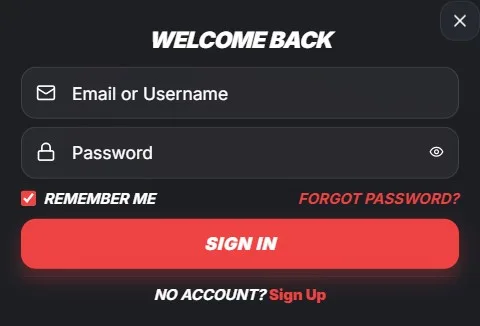
Three steps take you to your BigSlotz account on our platform. First, open the official BigSlotz website in your browser. Then select the login control shown in the site navigation.
Enter the email address linked to your registered account. Enter your password exactly as you created it. We then check your details before opening your account area.
- Open the official BigSlotz website.
- Select the login control.
- Enter your registered email address.
- Enter your password.
- Submit your details to continue.
Use the same email address that you provided during registration. Our sign-in process connects that email to your player account. Check your spelling before submitting your details.
BigSlotz registered email and password
Your registered email identifies your account with us. We use it for sign-in, account messages, and password recovery. Keep access to that mailbox while you hold an account.
Your password protects your balance, personal details, and account settings. We ask you to enter it without sharing it with anyone else. Passwords distinguish between capital and lower-case letters.
If sign-in does not work, re-enter both details carefully. Remove accidental spaces before or after your email address. Check whether your keyboard’s Caps Lock function is active.
- Use the email linked to your BigSlotz registration.
- Enter each character of your password accurately.
- Check capital letters, numbers, and symbols.
- Avoid saved details on public or shared devices.
We keep account access separate for every registered player. Do not attempt to sign in through another person’s account. Each player must use their own registered details.
BigSlotz password recovery flow
The “Forgot password” option starts our password recovery process. Select it from the BigSlotz sign-in area when you cannot remember your password. Enter the email address linked to your account.
We send recovery instructions to that registered email address. Open the message and follow the provided reset steps. Create a new password that you have not used elsewhere.
Check your spam or junk folder if the email does not appear. Confirm that you entered the correct registered email address. Request a new recovery message only through our official platform.
- Select “Forgot password” from the sign-in area.
- Enter your registered email address.
- Open our password recovery email.
- Follow the reset instructions.
- Sign in using your new password.
Our recovery process protects your account by using its registered contact address. Never forward a reset email or recovery link. Contact our support team through official channels if you cannot access that email.
BigSlotz login issues and account access
Wrong credentials are the most common reason for a failed BigSlotz sign-in. An incorrect email address prevents us from locating your account. An incorrect password prevents us from confirming access.
An unverified email address can also stop account access. We require email verification to confirm that your contact details belong to you. Check your inbox for our verification message and complete its instructions.
| Login issue | What it means | What to do |
|---|---|---|
| Wrong email | The address does not match our records | Check the registered email |
| Wrong password | The entered password differs from ours | Use password recovery |
| Unverified email | Email confirmation remains incomplete | Complete our verification steps |
| Active self-exclusion | Account access is restricted | Wait until the restriction ends |
We also block access during an active self-exclusion period. This restriction supports your chosen safer gambling controls. Our team cannot restore access while a valid self-exclusion remains active.
BigSlotz email verification support
Email verification confirms your contact address with us. We send a verification message after account registration. Follow the link or instructions in that message to complete the process.
Use the same mailbox when you sign in to BigSlotz. If you cannot find our message, check spam, junk, and filtered folders. Search your inbox for messages from our official communications.
A verification link can expire for security reasons. Request another verification message through the relevant account process. Do not use old links from forwarded or unknown emails.
- Check the inbox for your registered address.
- Review spam and junk folders.
- Complete the verification instructions promptly.
- Use only links sent by us.
We use verification to help protect accounts from unauthorised access. Keep your registered email address current through the available account support process. You need access to it for recovery messages.
BigSlotz self-exclusion and login restrictions
An active self-exclusion prevents access to your BigSlotz account. We apply this restriction for the full period selected during the self-exclusion process. It remains in place even if you remember your password.
Do not create another account to bypass an active restriction. We treat self-exclusion as an important safer gambling measure. Our controls help you maintain the limits you chose.
If you are unsure about your account status, contact our support team. Use official BigSlotz contact channels and provide accurate account information. We can explain the applicable access restriction.
BigSlotz account security
Only enter your credentials on the official BigSlotz website. Check the website address before providing your email address or password. Do not follow sign-in links from unexpected messages.
We never need you to share your password with another person. Keep it private from friends, family, and anyone claiming to represent us. Our support team does not require your password to assist you.
Choose a unique password for your account with us. Combine upper-case letters, lower-case letters, numbers, and symbols. Avoid names, birth dates, or easily guessed words.
- Use the official BigSlotz website.
- Keep your password private.
- Do not reuse passwords across services.
- Sign out on shared devices.
- Report suspicious account activity promptly.
BigSlotz sign-in limits and support
Account access depends on valid credentials and an active account status. We cannot process sign-in where email verification remains incomplete. We also cannot permit access during self-exclusion.
Use password recovery when you cannot remember your password. Use official support channels when you cannot access your registered email. We can help you understand the next available account step.
Never disclose passwords, recovery links, or verification codes. These details protect your account and should remain under your control. BigSlotz applies these access measures to help keep your account secure.